WhatsApp moved your template from Utility to Marketing: what it means and what to do
Meta can move a Utility template to Marketing, even while it is in review. Here is why it happens, what it does to your price, how ChatBridge24 shows it and how to ask for a review.
On this page
You submit a WhatsApp template as Utility. A minute later it says Marketing. Nobody asked you, and the only clue may be a label that changed colour.
This is not a glitch. On the WhatsApp Business API, Meta decides the category of every template, and the category sets the price of every message sent with it. So it is worth knowing why it happens, what it changes, and what you can do about it.
Why Meta moves a template
For a template to count as Utility, Meta’s guidelines ask for two things. It must not be promotional, and it must either relate to something specific to the customer, such as their order, account or transaction, or be essential to them, such as a fraud alert. Everything else is Marketing.
Two cases catch people out:
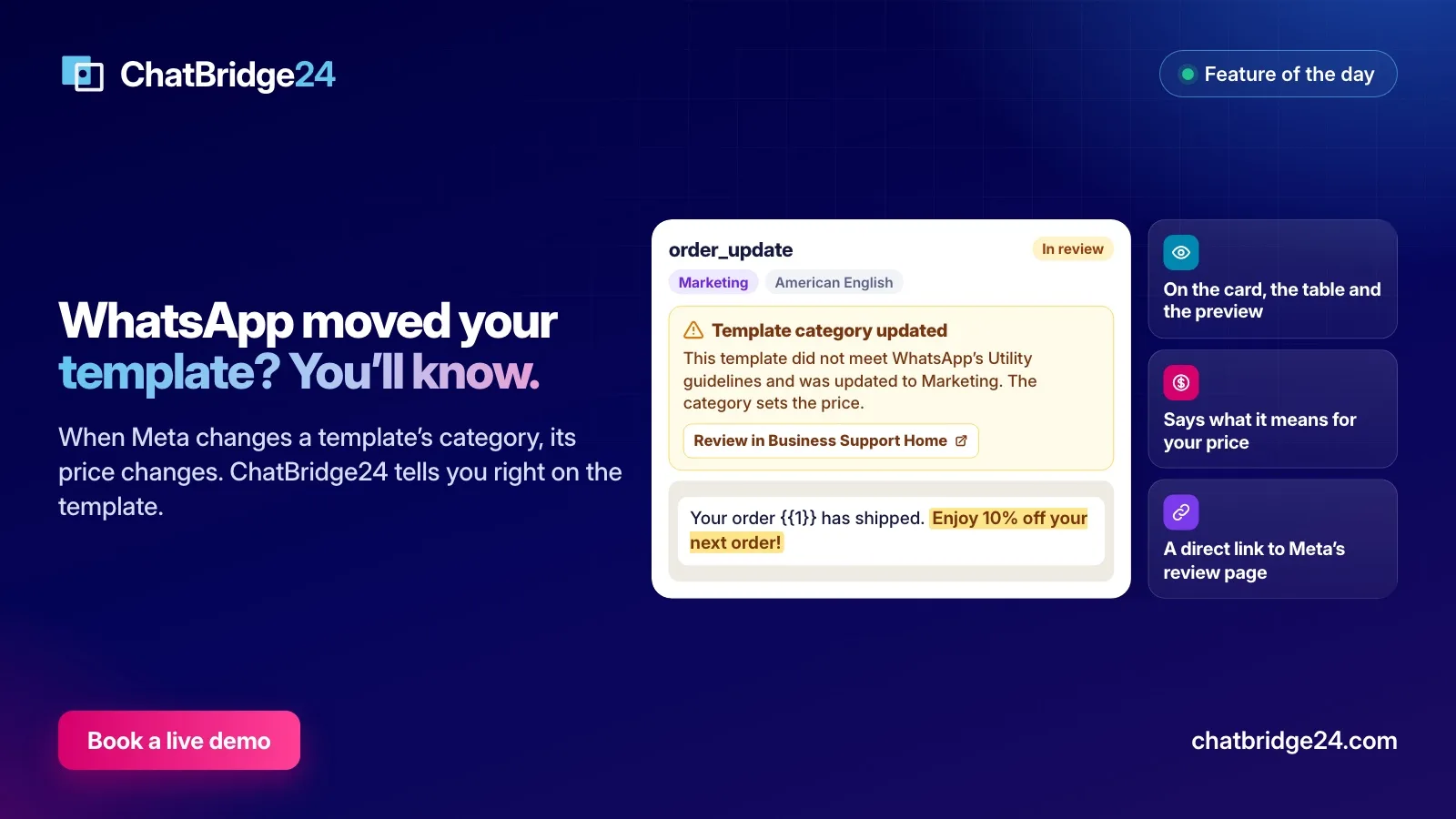
- Mixed content. A useful update with one selling line added counts as Marketing. “Your order {{1}} has shipped. Enjoy 10% off your next order!” is the classic example.
- Unclear content. A message too vague to judge, such as one that is mostly a placeholder or only says “Congratulations!”, counts as Marketing too.
Meta can make this decision at two moments:
- When you submit the template. Since April 9, 2025, if you choose Utility and WhatsApp judges the content to be Marketing, the template goes ahead as Marketing. The old setting that allowed this no longer makes a difference.
- After approval. Meta also reviews approved templates from time to time. A template that does not meet the guidelines can be moved, normally with one day’s notice, and with no notice at all for a business that has been warned about misusing categories. Repeated misuse can go further, up to Meta moving all of a business’s approved Utility templates to Marketing, so it is worth fixing the pattern and not only the one template.
What changes, and what does not
- The price changes. Meta charges for each template it delivers, by category and by the recipient’s country, and Marketing usually costs the most. Every send from now on is charged at the new category. See WhatsApp Business API pricing for the rules.
- Past messages do not change. What you have already been billed for stays as it was.
- The review status does not change. A template that is in review stays in review, and an approved one stays approved.
- The words do not change. The template still says exactly what you wrote.
How ChatBridge24 tells you
A change that affects your costs should not depend on somebody happening to open WhatsApp Manager. In ChatBridge24, the news appears on the template itself, in the Bitrix24 WhatsApp app and in the standalone WhatsApp workspace alike:
- On the template’s card and in its preview, a “Template category updated” notice names the old and the new category, says what that means for your price, and gives the date of the change.
- In the template table, a short line under the category says “Moved from Utility”.
- Before a move happens, when Meta gives notice of one, the template says so too.
A notice comes with a direct link to Meta’s review page, and it retires by itself once the review period has passed. If that page opens blank inside the Bitrix24 window, copy the address shown in the notice into a new browser tab.
Ask for a review, or rewrite?
Ask for a review if the message really is about the customer’s own order, account or booking. A review can only be requested on Meta’s side:
- Open Business Support Home, using the Meta login that manages your WhatsApp Business Account.
- Open Template Category Updates.
- Select the template and press Request Review.
You can do this for up to 60 days from the date the category was updated. Your request then appears under the In review tab. If Meta agrees, the category is updated, and ChatBridge24 shows the new one by itself. If not, it stays as it is.
Rewrite if the message contains anything that sells. Be honest with yourself here. If there is a discount, a “don’t miss” or a suggestion to buy something else, a review is unlikely to help. Take the selling line out, submit the clean version as a new template, and send the promotion separately in one of your WhatsApp marketing campaigns, using audience segmentation to reach only people who agreed to receive it.
Keep your next one in Utility
- Give each template one job, and make that job obvious from the first line.
- Name the specific thing it is about: the order number, the booking date, the account.
- Leave out offers, invitations to buy, and cheerful extras.
- Fill every value with an example that makes the purpose clear when you submit it.
More on getting through review is in how to get WhatsApp message templates approved the first time, and everything the template library does is on the WhatsApp message templates page.
ChatBridge24 is built by Saabsoft, an official Bitrix24 Dubai partner. If you send your templates from Bitrix24 and want help with the CRM around them, its Bitrix24 UAE team works with businesses across the Emirates.
Common questions
Can I stop Meta from moving my template?
No. Since April 9, 2025, Meta applies the category it judges correct by itself. You can write the template so that it clearly qualifies, and you can ask for a review if you think Meta got it wrong.
How long do I have to ask for a review?
Up to 60 days from the date the category was updated.
Does a move stop the template from being sent?
No. An approved template stays approved when Meta moves it to Marketing. Only the category, and so the price, changes.
Does a move change what I have already paid?
No. Every send from then on is charged at the new category. Messages already billed are not affected.