Send WhatsApp automatically when a Bitrix24 deal moves stage
Add a WhatsApp step to your Bitrix24 automation rules: an approved template, filled from the record's own fields and written on its timeline, every time a lead or deal moves.
On this page
Some WhatsApp messages should never depend on somebody remembering to send them: the viewing confirmation, the reminder the day before, the thank-you when a deal is won. In Bitrix24, those moments already exist as stages in your pipeline.
With ChatBridge24, our WhatsApp CRM integration, an automation rule can send WhatsApp when a record reaches one of those stages, with the customer’s details filled in from the record itself. This article shows what the step does, how to set it up, and what happens on the day a message cannot be sent.
What the step does
The ChatBridge24 Bitrix24 WhatsApp app on the Bitrix24 Marketplace adds a step to Bitrix24’s automation designer, called WABA · Send approved template. It works on leads, deals, contacts, companies and Smart Processes.
It sends one approved template from a number connected to the WhatsApp Business API. Because it is a template, it can reach a customer who has not written to you recently, which is exactly what a reminder needs to do. You can add as many steps as you have moments worth marking, each with its own template.
Set it up in five steps
- Get a template approved. Write and submit your WhatsApp message templates in ChatBridge24. Only an approved template can be sent.
- Open the automation rules. In Bitrix24, open the automation rules for your pipeline and choose the stage, for example Meeting.
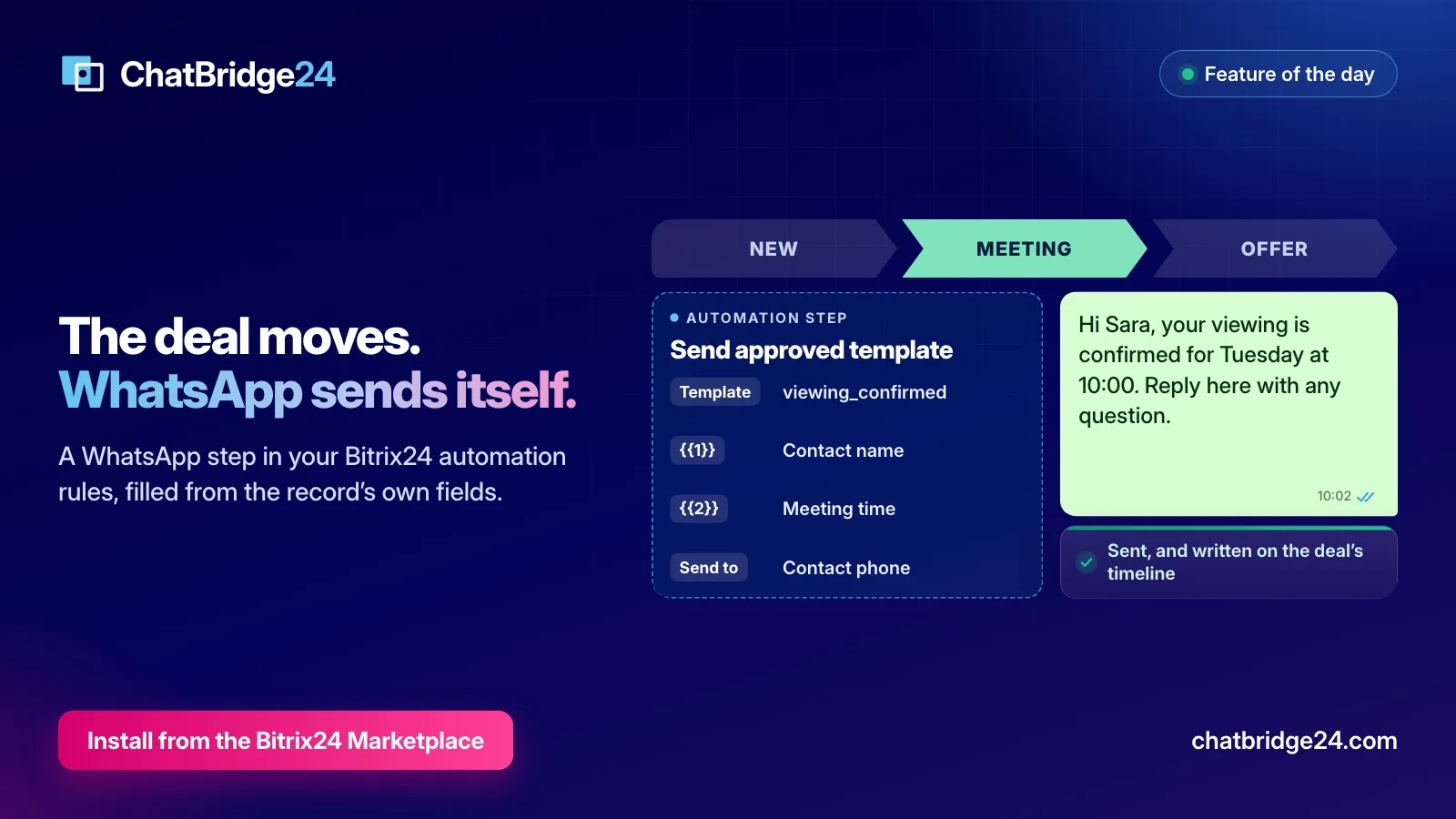
- Add the step. Add WABA · Send approved template, then choose the number and the template.
- Fill the values. Each numbered value in the template gets its own box, up to 30 of them, and you fill each one from the record’s fields: the contact’s name, the meeting time, the branch.
- Point Send to at a phone field. It sends only to the phone field you choose. If that field is empty on a record, nothing is sent.
Examples that work well
Here is how this might look for a sales team that books viewings:
- Deal moves to Meeting. “Hi Sara, your viewing is confirmed for Tuesday at 10:00. Reply here with any question.”
- The day before the meeting. A delay in the rule sends a reminder with the time and the address, filled from the record.
- Deal moves to Offer. “Your offer is ready. Reply here and we will go through it with you.”
- Deal won. A thank-you, with a link to leave a review.
- Lead untouched for three days. A notice to the responsible person’s own mobile, by pointing Send to at their phone field. Not every automated message has to go to the customer.
When the customer replies, the answer reaches your team like any other WhatsApp message: in Open Channels, in the WhatsApp shared inbox and in the WhatsApp tab on the record.
What happens when a message cannot be sent
An automation that fails silently is worse than no automation, because everybody assumes the customer was told. So the step reports back every time. Every outcome, whether sent, failed or refused with a reason, releases the step and writes an entry on the record’s timeline. The rule never waits on a message.
The reason is written where the person who can fix it will see it. Typical ones are an empty phone field, or a step with fewer value boxes than its template needs.
A blank value is treated differently, because an empty CRM field on one record should not stop a notification going out. Each blank keeps its own place and is sent as a dash, and nothing shifts up, so value three never becomes value four.
Choose the category with care
Meta charges for each template it delivers, by category and by the recipient’s country, and marketing templates usually cost the most. An automation can send a lot of messages without anybody looking at them, so it is worth a moment’s thought:
- A confirmation or reminder about the customer’s own booking belongs in Utility.
- Anything that sells, including a discount line added to a reminder, is Marketing, and usually belongs in your WhatsApp marketing campaigns instead.
The current rules are on per-message pricing. Meta has the final say on the category, so keep promotional lines out of templates you want to stay in Utility.
Test it on one deal
Automation rules belong to a pipeline, so if you run several pipelines, add the step to each one where the message should go out.
Before you turn a rule loose on your pipeline, create a test deal with your own mobile number in the phone field and move it through the stage. Check the message on your phone, then open the deal and read the entry on its timeline. Try it once more with a field left blank, so you know how that looks to a customer.
For a wider view of how automation fits with campaigns and the Bitrix24 WhatsApp bot, read Bitrix24 WhatsApp marketing: campaigns, automation and lead tracking.
Pipelines with many stages take some planning. ChatBridge24 comes from Saabsoft, an official Bitrix24 Dubai partner, and its Bitrix24 UAE team can design these rules with you as part of a wider CRM project.
Common questions
Which Bitrix24 records can use the WhatsApp step?
Leads, deals, contacts, companies and Smart Processes.
Which plans include the automation step?
The automation step and the Bitrix24 app are in every plan. Meta charges separately for each template it delivers, by category and by the recipient's country.
Can a rule send to the responsible person instead of the customer?
Yes. Point the step's Send to at any phone field on the record, including the responsible person's mobile. It only ever sends where you point it.
What happens if the message cannot be sent?
The step is released with the reason, and the reason is written on the record's timeline. The automation rule never hangs.