WhatsApp usernames: how to keep answering customers who hide their phone number
As WhatsApp usernames roll out, some customers reach you with no phone number at all. Here is what changes for a business, and how ChatBridge24 keeps, answers and identifies them.
On this page
For as long as businesses have used WhatsApp, the customer’s phone number has been the key to everything: the chat, the CRM record, the opt-out list. WhatsApp usernames change that. A customer who adopts a username can write to you without your system ever being given their number.
Handled badly, that means a message nobody can see or answer. Handled well, it is simply another customer. Here is what is changing, and how ChatBridge24, our WhatsApp CRM integration, deals with it.
What is changing
Three things from Meta matter here:
- Usernames. WhatsApp users can choose a username, which appears in the app in place of their phone number. They are rolling out gradually during 2026.
- Business-scoped user ids. Every WhatsApp user now has an id that is unique to each business portfolio, known as a BSUID. Meta began sending these on the WhatsApp Business API in April 2026, and since July 2026 businesses can send messages to them.
- Missing phone numbers. When a customer has adopted a username, Meta usually leaves their phone number out of what it sends you. It still includes the number if you or the customer messaged or called that number in the last 30 days, or if they are in your contact book. That 30-day check runs separately for each of your business numbers.
So a customer who has never written to that number before, and who uses a username, may arrive with no number at all.
Why this matters
Plenty of business software treats the phone number as required. If it is missing, the message may fail at the door, or a CRM record may be created with nothing to match it against later. Meta does not resend a message you failed to keep. It also means the chat may have nothing to match against in your CRM, so two records for one person become a real risk.
What ChatBridge24 does
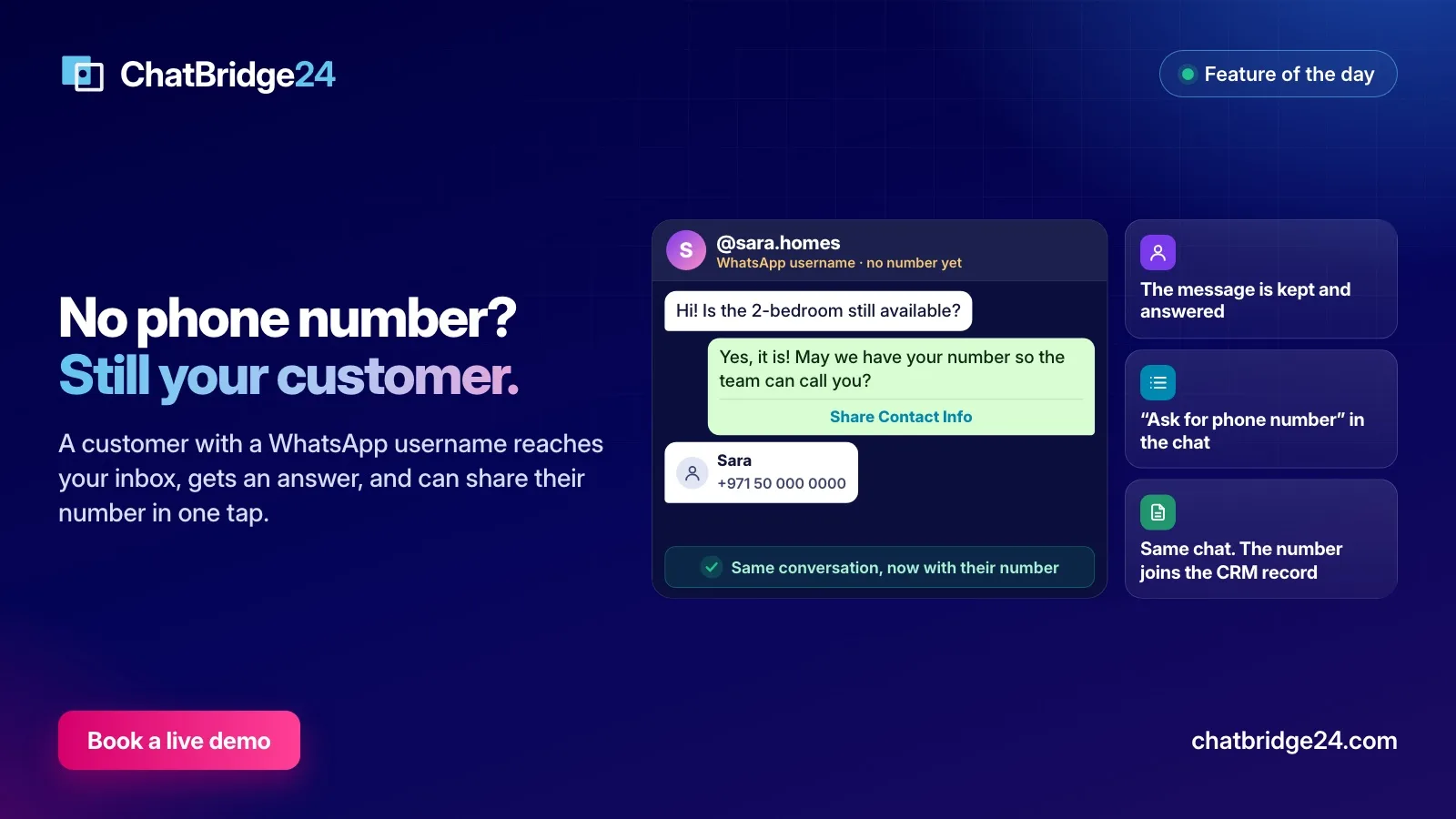
- It keeps the message. The conversation appears in your WhatsApp shared inbox under the customer’s username, like any other, and in Open Channels if you use Bitrix24.
- It answers. Replies from the inbox and from Open Channels, approved templates, and your WhatsApp chatbot all reach the customer by their id. Your team does nothing differently.
- It asks for the number, when you want it. In a username conversation, the composer offers Ask for phone number. The customer receives your message with a button to share their contact details, and sharing takes one tap. It counts as a message.
- It can ask outside the 24 hours too. Once the customer service window has closed, a template of the “Ask for phone number” kind does the same job, with WhatsApp’s own Share Contact Info button.
- It moves the chat onto the number. When the customer shares it, the same conversation carries on under their number, with its history in place. In the Bitrix24 WhatsApp app, the number is also added to the CRM record, and the chat stays in the same Open Channels thread.
- It respects opt-outs. If a customer with no number says STOP, that is recorded against their id, and it follows them to their number if they share it later.
What your team will notice
Very little changes from day to day. A username conversation looks like any other in the inbox, except that the customer appears under their username and the contact details show no phone number. Your team can assign it, label it and reply as usual. The one practical difference is that nobody can call the customer until they share a number, and that is the moment to use Ask for phone number.
Limits worth knowing
- Authentication templates need a number. Meta does not let one-tap, zero-tap or copy-code authentication templates go to a BSUID, so ChatBridge24 refuses them before anything is spent.
- The id belongs to one portfolio. It only works with business numbers in the same Meta portfolio, so a message sent from another portfolio’s number will fail.
- Two conversations are not merged. If that phone number already has its own conversation with you, the two stay separate rather than being joined automatically.
What to do now
- Tell your team. A chat under a name like @sara.homes is a normal customer, not a mistake. Nothing needs fixing.
- Decide when you need the number. Many conversations can be finished without it. Ask when the next step really needs it, such as a phone call, and say why.
- Create one template. Set up an “Ask for phone number” template now, so that you have it ready when a chat goes quiet. Our page on WhatsApp message templates shows where the templates live.
- Check your other systems. If you connect any CRM through our webhooks,
message.receivedsendsfromas null for these customers and gives youcontact.userIdandcontact.usernameinstead. Make sure the system on the other side accepts that. The WhatsApp REST API page covers the webhooks.
If a review of your CRM sounds like a bigger job than you want to take on alone, ChatBridge24 is built by Saabsoft, an official Bitrix24 Dubai partner, and its Bitrix24 UAE team can go through it with you.
Common questions
Can I still message a customer who uses a username?
Yes. Replies, templates and bot messages go to them by the id Meta gives each customer. The exceptions are authentication templates sent as one-tap, zero-tap or copy-code, which still need a phone number.
Do customers have to share their number?
No. They only see a button if you ask, and sharing is their choice. The conversation carries on either way.
Will my existing customers disappear?
No. Meta still includes the phone number when you or the customer messaged or called that number in the last 30 days, or when they are in your contact book, and customers without a username are unaffected.
What happens to the chat when the customer shares their number?
The same conversation moves onto their number and its history stays in place. In the Bitrix24 app, the number is also added to the CRM record.