WhatsApp CRM integration for any CRM: webhooks, the REST API and the lead source
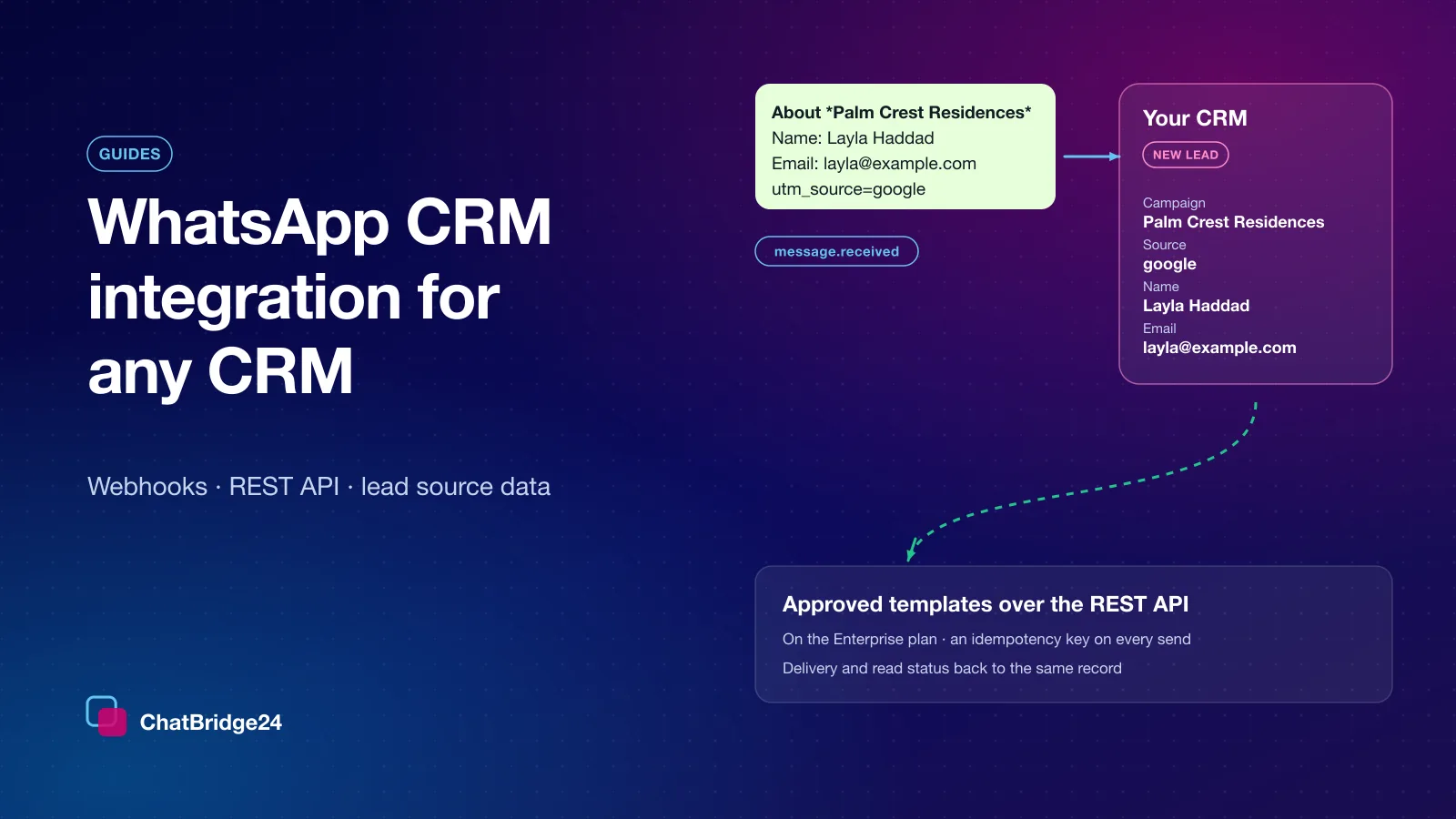
Three movements connect WhatsApp to any CRM: a signed webhook for every message, approved templates sent over the REST API on the Enterprise plan, and delivery receipts — with the landing-page campaign and the advert a lead came from.
On this page
A WhatsApp conversation is most useful where the rest of the customer already lives — the CRM — with the lead’s source attached and every message on the record. That is what a WhatsApp CRM integration is for. On Bitrix24, ChatBridge24 does it as a full-featured app; any other CRM connects to ChatBridge24 over signed webhooks and a REST API.
This guide explains what an integration actually has to do, how to build one for WhatsApp for any CRM with webhooks and a REST API, and where the lead source comes from when a customer arrives from a landing page or an advert. The webhooks and the API serve numbers connected to the official WhatsApp Business API.
The three movements every integration makes
Strip away the branding and a WhatsApp-to-CRM integration does exactly three things:
- A customer writes, and your system hears about it. The message is stored and a signed webhook is posted to your endpoint. What it becomes is your decision — a lead, a task, a note on an existing record, a row in a queue.
- Your system sends. On the Enterprise plan, one API call sends an approved template on the same connected number — a confirmation, a reminder, a follow-up. Free-text replies are written by your team in the WhatsApp shared inbox.
- You learn what happened to each message. Delivery and read receipts arrive on the same webhook, so the state in your CRM is a fact rather than an assumption.
A native CRM connector does these three things for you. ChatBridge24’s is the Bitrix24 WhatsApp integration, the ChatBridge24 app on the Bitrix24 Marketplace: it turns the first message into a lead with the source filled in, shows the thread on the CRM card and lets an automation rule send a template. Over the webhooks and the API you build that behaviour yourself, with template sends on the Enterprise plan — which is also how it ends up matching your own data model exactly.
Receiving: the message.received webhook
Every inbound message on a WhatsApp Business API number produces one message.received
event. Each request carries a timestamp header and an HMAC signature over the timestamp
and the raw body, so you can prove it came from us and refuse a replay:
x-cb24-event: message.received
x-cb24-timestamp: 1789400000
x-cb24-signature: v1=9f86d0818…
The payload carries the message itself — its id, the sender’s number, its type, its text and its WhatsApp timestamp — and, since October 2026, what a CRM needs to file it:
conversationId— stable for the thread, so you can link every message to one record.contact— the sender’s WhatsApp id and the profile name they chose.firstMessage—trueon the message that opened the conversation.lead— on the first message only, the lead source: the campaign, the form fields, the tracking parameters and the Click-to-WhatsApp advert, when there was one.
Where the lead source comes from
There are two ways a customer arrives with context, and they behave differently.
From a landing page. A wa.me link carries nothing but its prefilled text — no
referrer, no cookie, no click id. So a well-built landing page writes the context into
that text: the project name in bold, the form answers on their own lines, the
utm_source and utm_campaign values at the end. The lead block reads exactly that:
"lead": {
  "campaign": "Palm Crest Residences",
  "fields": [ { "label": "Name", "value": "Layla Haddad" }, { "label": "Email", "value": "layla@example.com" } ],
  "tracking": { "utm_source": "google", "utm_campaign": "spring-offer" },
  "ad": null
}
From a Click-to-WhatsApp advert. Meta attaches a referral to the first message: the
advert id, its headline, the destination URL and a click id. That arrives as lead.ad.
Meta never sends the advert’s name, so if your reports group by name, keep your own
id-to-name table on your side.
Sending: approved templates over the REST API
On the Enterprise plan, your system sends approved templates through the WhatsApp REST API, on the number the customer wrote to. The API sends templates only, never free text. API keys, the read routes and the webhooks are part of every Business API plan. Two rules make sending safe to call from a job queue that retries:
- Every send carries an idempotency key. Repeat a request with the same key and you get the first outcome back instead of a second message — and a second charge.
- Keys are scoped and stored only as a hash. Give each integration its own key, so one can be revoked without touching the others.
An approved template may be sent whether or not the 24-hour customer-service window is open. Free text is what WhatsApp limits to that window — measured from the customer’s last inbound message, never from yours — and it is written by your team in the inbox, where the window is checked before anything is sent.
Reliability: what happens when your endpoint is down
Your endpoint will be down at some point: a deploy, an expired certificate, a busy database. A webhook queue that gives up in minutes turns a routine outage into lost leads. Deliveries are therefore retried on a schedule that spans about eleven hours, one delivery per endpoint in flight at a time so they arrive in order. An endpoint that keeps failing for hours is switched off and its events are held, not discarded — a successful Test from the dashboard switches it back on and releases them.
Two things are on you: answer quickly with a 200 and do the work afterwards, and make
your handler idempotent, because “at least once” is the honest promise any webhook system
can make.
Do you need a CRM at all?
Not necessarily. You can start with the standalone WhatsApp workspace — the shared inbox, templates, campaigns and the bot — and connect a CRM later. Nothing is lost when you do: the conversations you have already had stay where they are, and new ones start flowing to the webhook the moment you register it.
A build plan for a small team
- Register one endpoint for
message.receivedandmessage.status, and verify the signature on every request before you parse it. - On
firstMessage: true, create the lead and storeconversationIdon it; write theleadblock into your source fields. - On every later message, append to the record you stored.
- On the Enterprise plan, send approved templates through the API with a fresh idempotency key per intended send.
- Update the record’s state from
message.status.
That is a working WhatsApp-to-CRM integration in five steps, on any system that can make an HTTPS request. The plans and what each includes are on ChatBridge24 pricing, and the full payload reference sits beside the keys in the dashboard.
Common questions
Which CRMs can WhatsApp be connected to?
Any system that can receive an HTTPS request and make one. Bitrix24 has a native connector, the ChatBridge24 app on the Bitrix24 Marketplace; every other CRM connects over the signed webhooks and the REST API, which serve numbers on the WhatsApp Business API.
Does the webhook say where the lead came from?
Yes, on the first message of a conversation: the landing page’s campaign, its form fields, the utm_* parameters and the Click-to-WhatsApp advert when there was one.
What happens if my webhook endpoint is down?
Deliveries are retried for about eleven hours, in order, one at a time per endpoint. An endpoint that keeps failing is switched off and its events are held until a successful test switches it back on.
Last updated 24 October 2026.